Command Your
Wireless Drivetrain


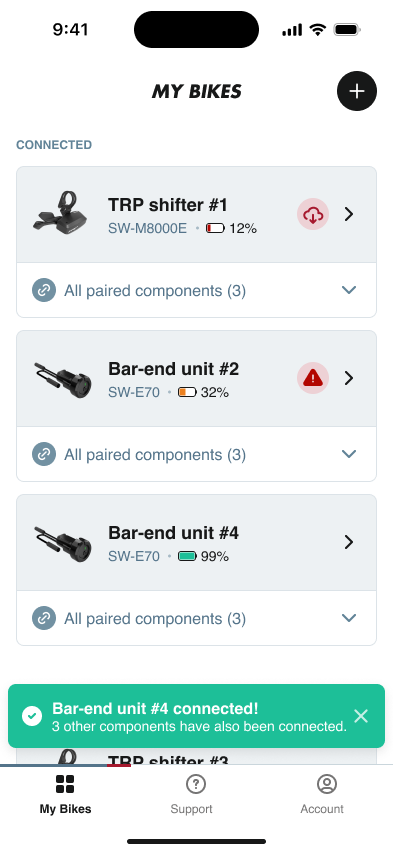
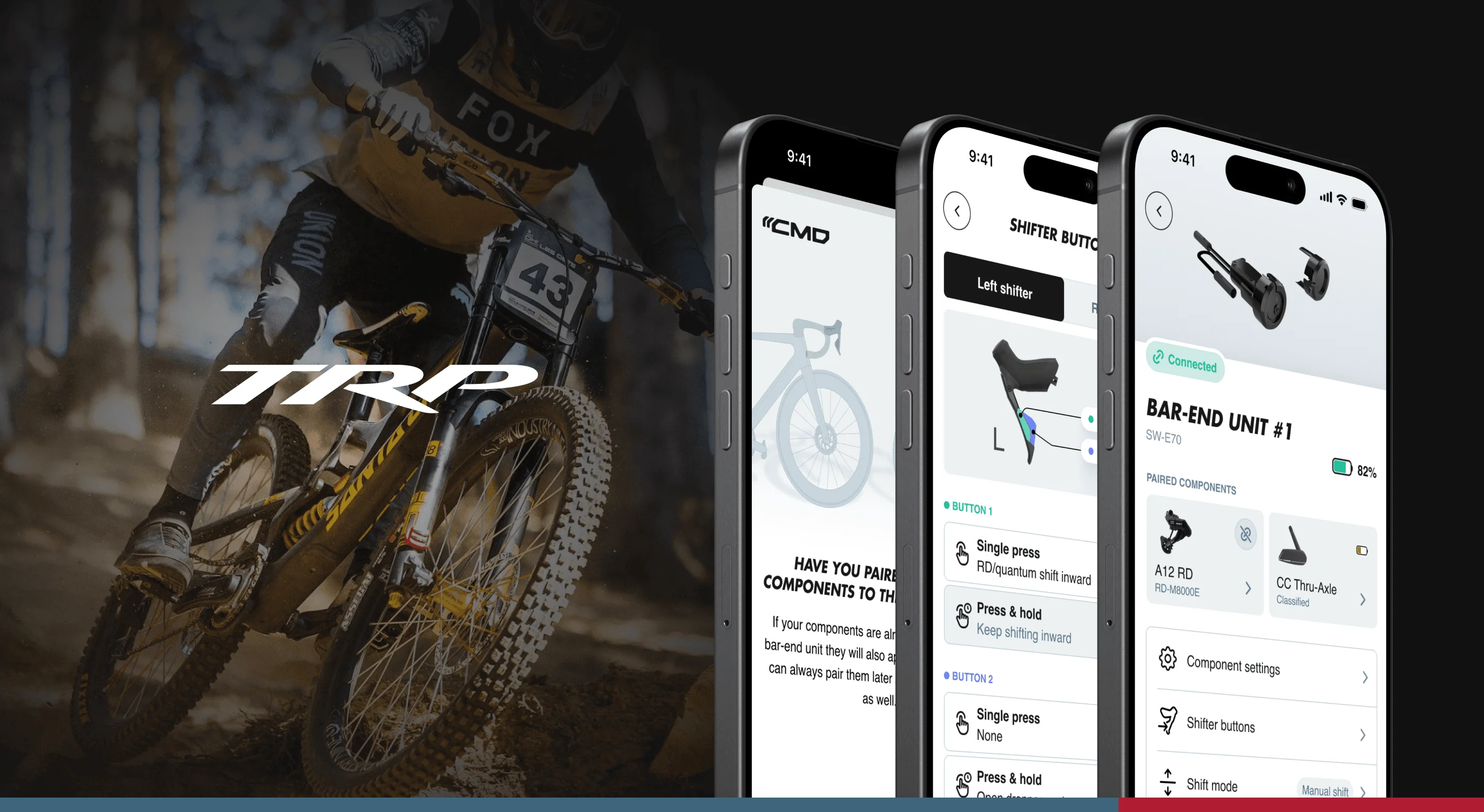
TRP Cycling needed a user-friendly companion app for their wireless shifting protocol CMD, ensuring seamless connectivity with the VISTAR drivetrain and an intuitive experience for riders to control and personalize their shifting.
TRP's CMD (Command) wireless shifting system represents a leap forward in drivetrain technology. They needed a technical partner who could deliver a production-grade Flutter app, one that reliably communicates with CMD hardware via BLE, handles real-time shifting mode control, and delivers the precision competitive cyclists demand.

Delivering production-grade Flutter engineering: reliable BLE communication, real-time shifting protocol, and cross-platform device management.
We led the implementation using our six-step framework, with our design partner Fabrikate delivering the UI. The app gives riders precise, on-the-go control over their shifting - toggling between manual and automatic modes, dialing in ideal cadence, and customizing gear settings with a few taps.

1. IDENTIFY & VALIDATE
We analyzed the CMD protocol specifications and BLE communication requirements to map the technical implementation path. Understanding how competitive and recreational cyclists interact with shifting technology informed our engineering priorities: connection reliability, low-latency mode switching, and battery efficiency.
1. IDENTIFY & VALIDATE
We analyzed the CMD protocol specifications and BLE communication requirements to map the technical implementation path. Understanding how competitive and recreational cyclists interact with shifting technology informed our engineering priorities: connection reliability, low-latency mode switching, and battery efficiency.
2. IMPACT MAPPING
We mapped each feature to rider outcomes. Automatic shifting mode reduces cognitive load during climbs. Manual override gives experienced riders full control. Real-time battery monitoring prevents mid-ride surprises. Every implementation decision was tied to measurable improvements in ride quality.
3. TECHNICAL AUDIT
We assessed TRP's CMD protocol, BLE communication requirements, and the VISTAR drivetrain's firmware architecture. The audit confirmed Flutter's suitability for reliable wireless communication and identified the optimal approach for real-time shifting mode control.

4. INTERACTIVE PROTOTYPING
We built functional prototypes stress-testing BLE communication with real TRP hardware. Testing with actual CMD devices validated connection stability, shifting latency, and firmware update reliability across both road and gravel use cases.
5. DEVELOPMENT & LAUNCH
Built with Flutter for cross-platform iOS and Android support, the app implements TRP's CMD protocol for real-time shifting control, firmware updates, and device management. The BLE stack we engineered delivers reliable wireless communication even in challenging outdoor conditions.

6. ITERATE & OPTIMIZE
Post-launch analytics track shifting mode usage, pairing success rates, and feature adoption. This data drives continuous improvements to connection stability, shifting responsiveness, and the overall rider experience across different bike configurations.
The TRP CMD app empowers riders to get the most out of their VISTAR drivetrain. Toggle between manual and automatic shifting, customize gear ratios, monitor battery levels, and keep firmware current. All powered by a robust BLE implementation engineered for the precision competitive cyclists demand.
Facing a similar challenge?
Precision Shifting Control
Every feature was engineered to give riders seamless control over TRP's CMD wireless shifting system.
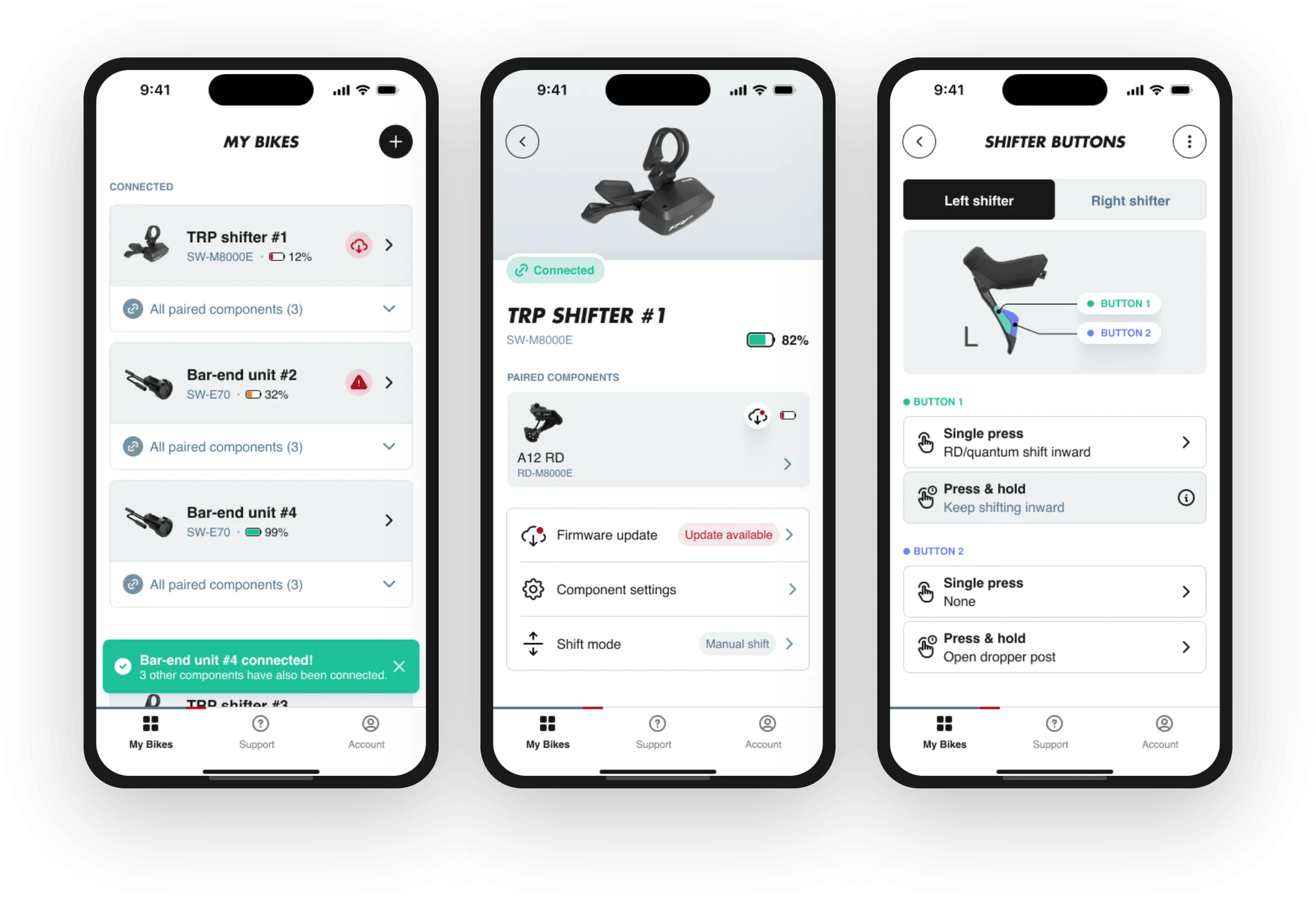
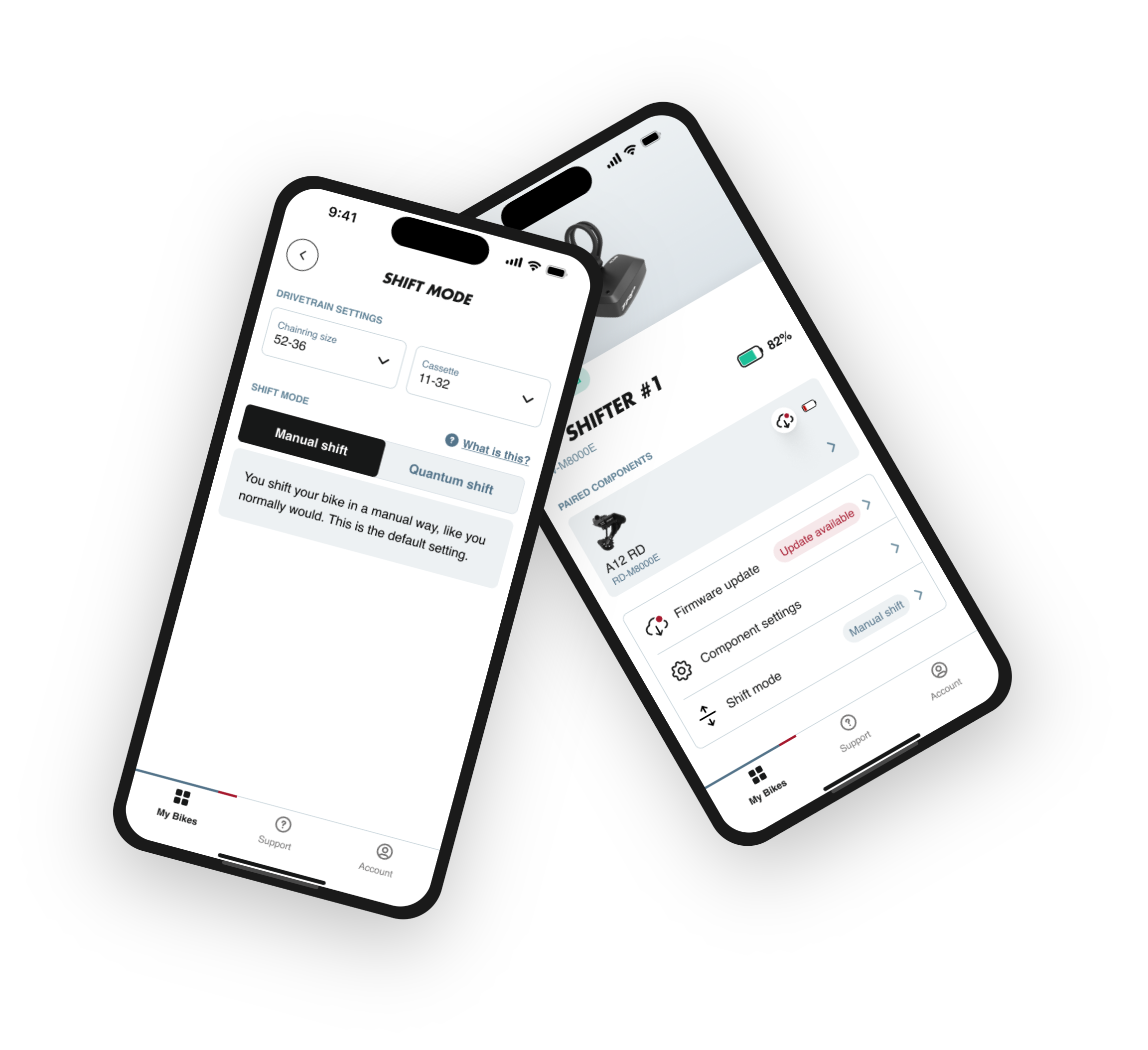
Toggle between manual and automatic shifting modes on the fly. In automatic mode, the system handles gear changes based on cadence and terrain. Switch to manual for full rider control.
Customize shifter button assignments and shift behavior. Configure the system to match your riding style, whether you prefer sequential shifting or direct gear access.
Pair TRP devices via BLE, monitor battery levels, check connection status, and perform firmware updates - keeping your drivetrain running at peak performance.
Access support resources directly from the app. Get help with setup, troubleshooting, and optimization to ensure your CMD system delivers the best possible ride experience.
Seamless connectivity from hardware to cloud
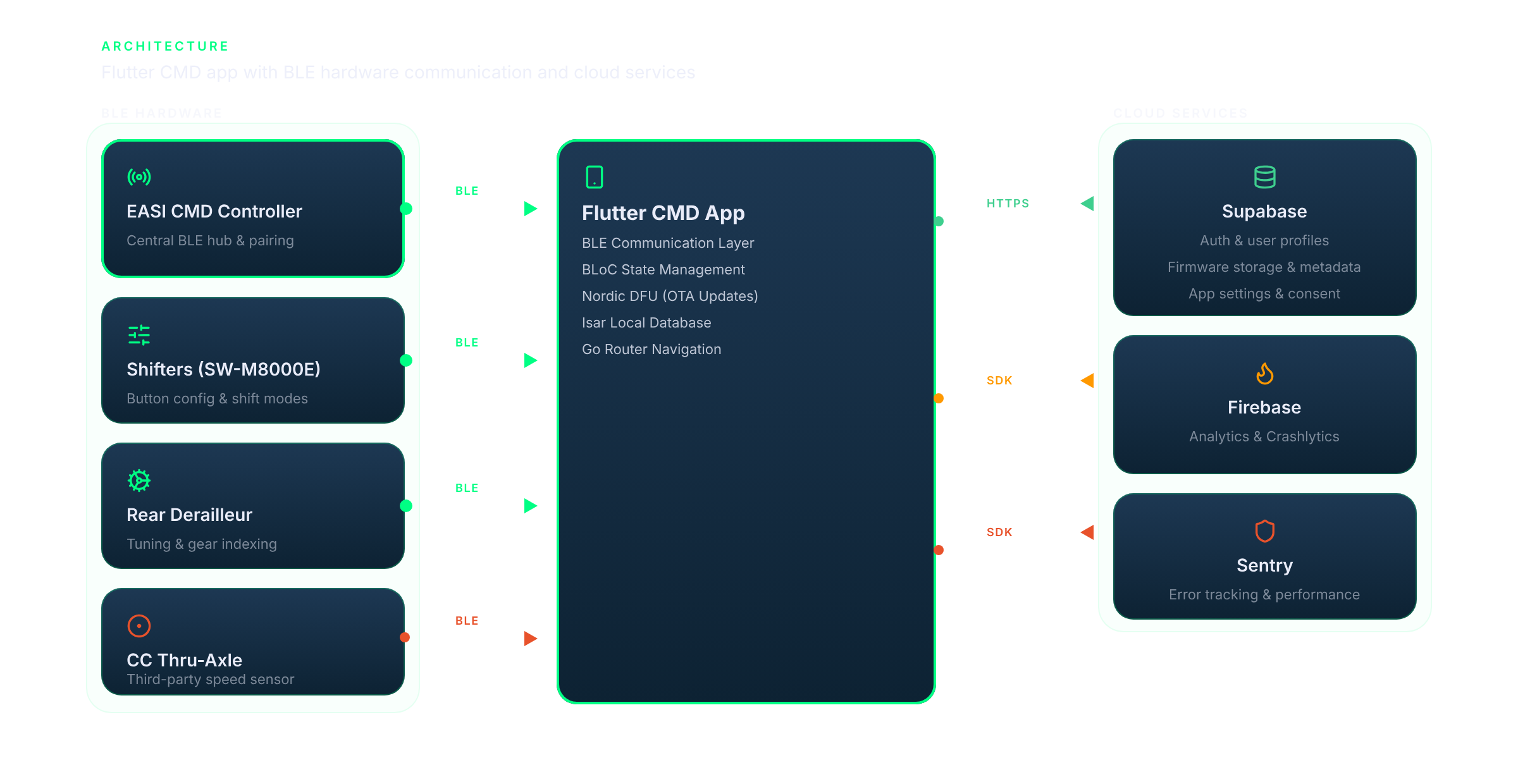
The Flutter app communicates with TRP's EASI CMD Controller and connected components via a custom BLE stack built on flutter_blue_plus. Shifting commands, battery telemetry, and device pairing flow through encrypted BLE characteristics. Supabase powers authentication, user profiles, firmware metadata, and OTA binary distribution via Nordic DFU. Firebase provides analytics and crash reporting, while Sentry handles error tracking and performance monitoring. BLoC state management with GetIt dependency injection keeps the architecture clean and testable, with Isar providing fast local persistence for offline operation.

Built with Flutter for a consistent, native experience on both iOS and Android.
The CMD companion app leverages Flutter's cross-platform capabilities to deliver reliable BLE communication with TRP Cycling's VISTAR drivetrain across iOS and Android. The clean, modern interface is backed by production-grade BLE engineering that makes complex shifting technology work reliably for every rider.
Have a similar challenge?
Tell us about your project in a free 30-minute discovery call. We'll share how we'd approach it, no strings attached.